

Credit: Etactics Inc
Not every health concern can wait for a regular appointment, but not every situation requires a trip to the hospital either. That's where our urgent appointments can help!
We offer urgent appointments with your own physician or a covering physician during the day, as well as appointments with an on-call physician during select evenings and weekends.
For more information about our clinic hours, appointment types, and when they're available, you can review our clinic hours.
Below, we’ll walk you through how to find an urgent appointment, what to expect when booking, and when you may need a different level of care.
-
Before booking an urgent appointment, it's important to make sure our clinic is the right place for your concern.
The information below is general medical guidance and is not intended to be medical advice. It is meant to help you decide, based on your medical concern, whether an urgent appointment at Magenta Health, a regular appointment, or another type of care may be appropriate.
While we offer urgent appointments for concerns that need timely attention, Magenta Health is not an urgent care centre.
We do not have on-site access to diagnostic imaging, such as X-rays, or laboratory services. If you think you have a broken bone or another injury that needs immediate testing or treatment, and isn't available at the clinic, you should go directly to an emergency department.
➤ If you or someone you're with has symptoms that are debilitating or rapidly changing, please call 911.
When in doubt, trust your gut. If your instincts are telling you it's an emergency, it's safest to go to the emergency department. You can also visit our External Emergency & Urgent Resources page for guidance on finding the right type of care.
If your concern isn't an emergency but you still need to see a doctor soon, an urgent appointment with our physicians may be the right choice.
-
Not every health concern fits neatly into an “urgent” or “not urgent” category. Some symptoms may look concerning but end up being less serious, while others might require tests or treatment that aren't available at a family doctor's office.
As a general guide, you may want to book an urgent appointment for concerns like:
Eye irritation without changes to your vision
Earaches
Sore throats, coughs or colds that haven't improved after several days
Vomiting or diarrhea when you can still keep some liquids down
Fainting when there is no associated injury
Mild-to-moderate breathing difficulties, such as mild-to-moderate asthma symptoms
Minor sprains and strains
Moderate back pain
Symptoms of a sexually transmitted infection
Cuts where the bleeding is controlled but may need a few stitches
Minor burns
Rapidly progressing skin rashes without a fever
If you're not sure whether your concern is appropriate for an urgent appointment, you can use the “Help deciding when to book an urgent appointment” option on your physician's booking page, or read through our guidance on when to book an urgent appointment for more information.
HOW TO BOOK AN URGENT APPOINTMENT
If an urgent appointment sounds like the right fit, you can get started on your physician's booking page.
Prefer a visual walkthrough? Watch our tutorial below to see how to find and book an urgent appointment.
1. Go to your physician's homepage
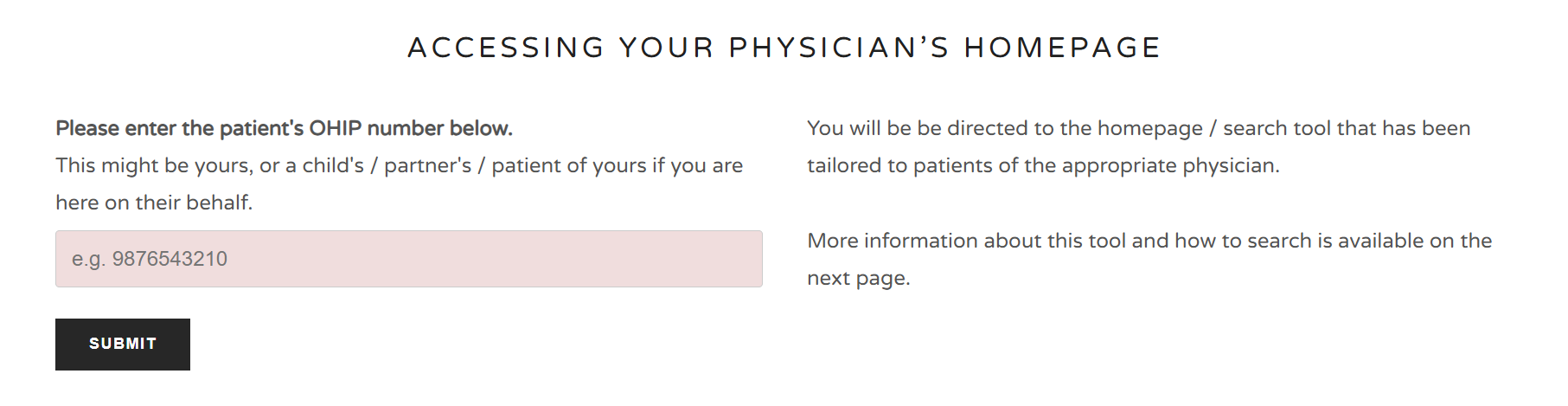
Visit our online booking page and enter the patient's OHIP number.
This can be your own OHIP number, or the number of a child, partner, or another patient you're booking on behalf of.
You'll then be directed to the homepage and booking tools specific to your physician.
2. Search for “urgent appointment”
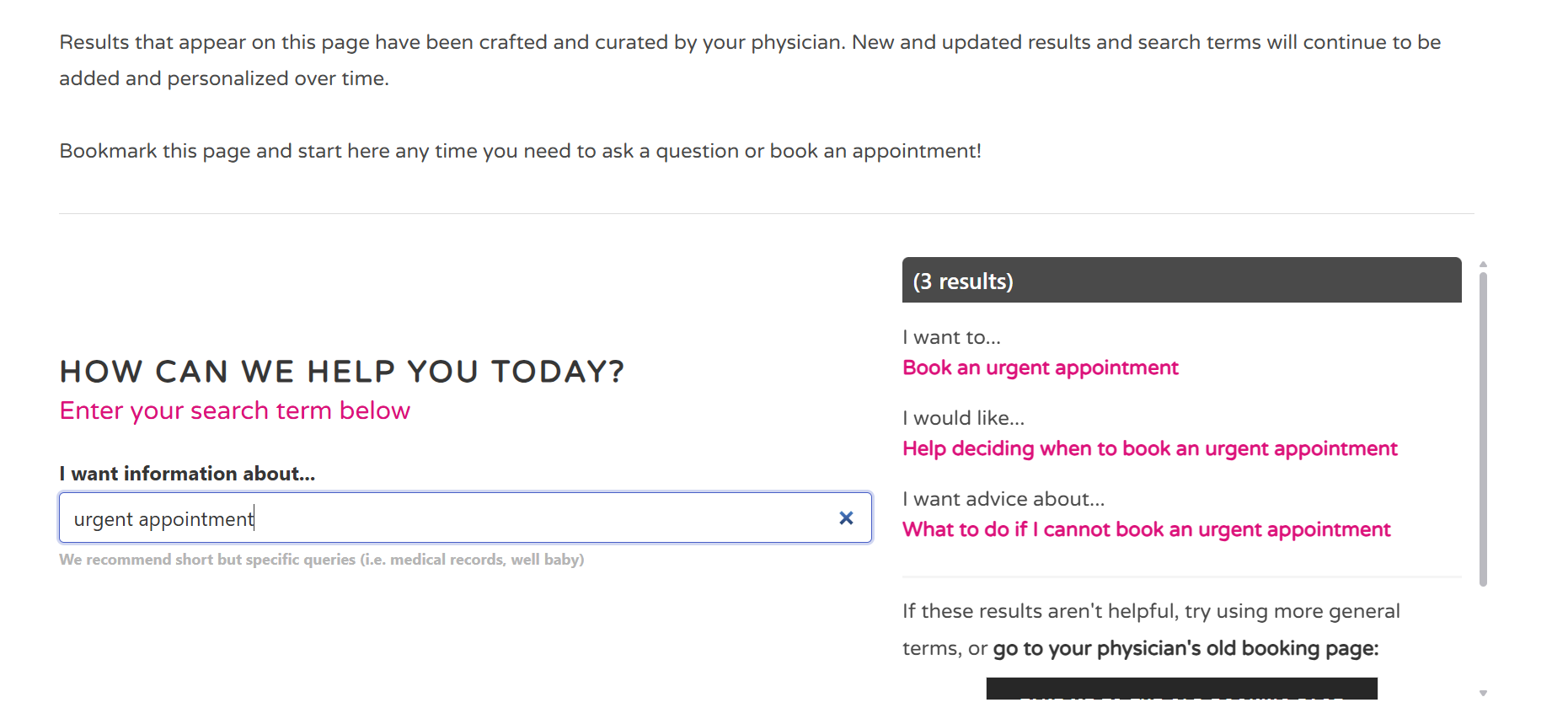
Once you're on your physician's homepage, search for urgent appointment.
You'll see a few options, including:
Book an urgent appointment
Help deciding when to book an urgent appointment
What to do if I cannot book an urgent appointment
Click “Book an urgent appointment”.
3. Select “Book an urgent appointment”
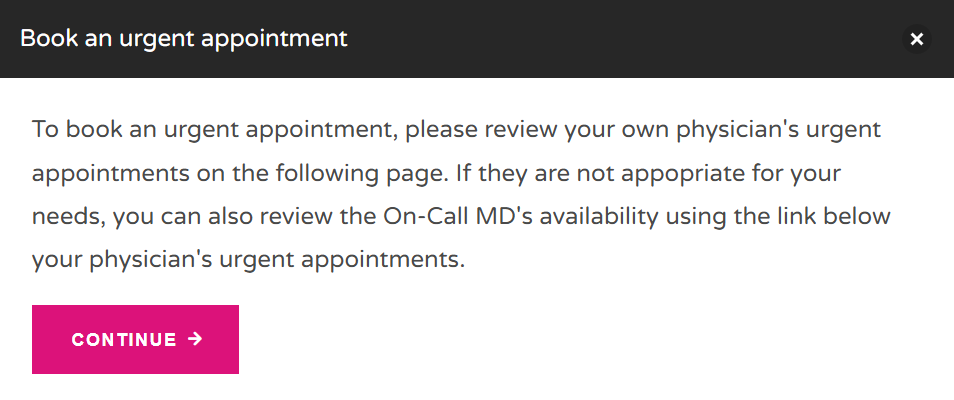
After you select Book an urgent appointment, you'll see some information explaining that you should first review the urgent appointments available with your own physician.
If those appointments aren't appropriate for your needs, you can also check the availability of an on-call physician.
Select Continue to move to the appointment scheduler.
4. Choose an urgent appointment with your physician or covering physician
On the scheduling page, scroll down until you see: Urgent Appointments With Your Own or a Covering Physician
These appointments are meant for new or urgent concerns that need timely attention. Urgent appointments aren't intended for ongoing or long-term issues that can be addressed during a regular appointment.
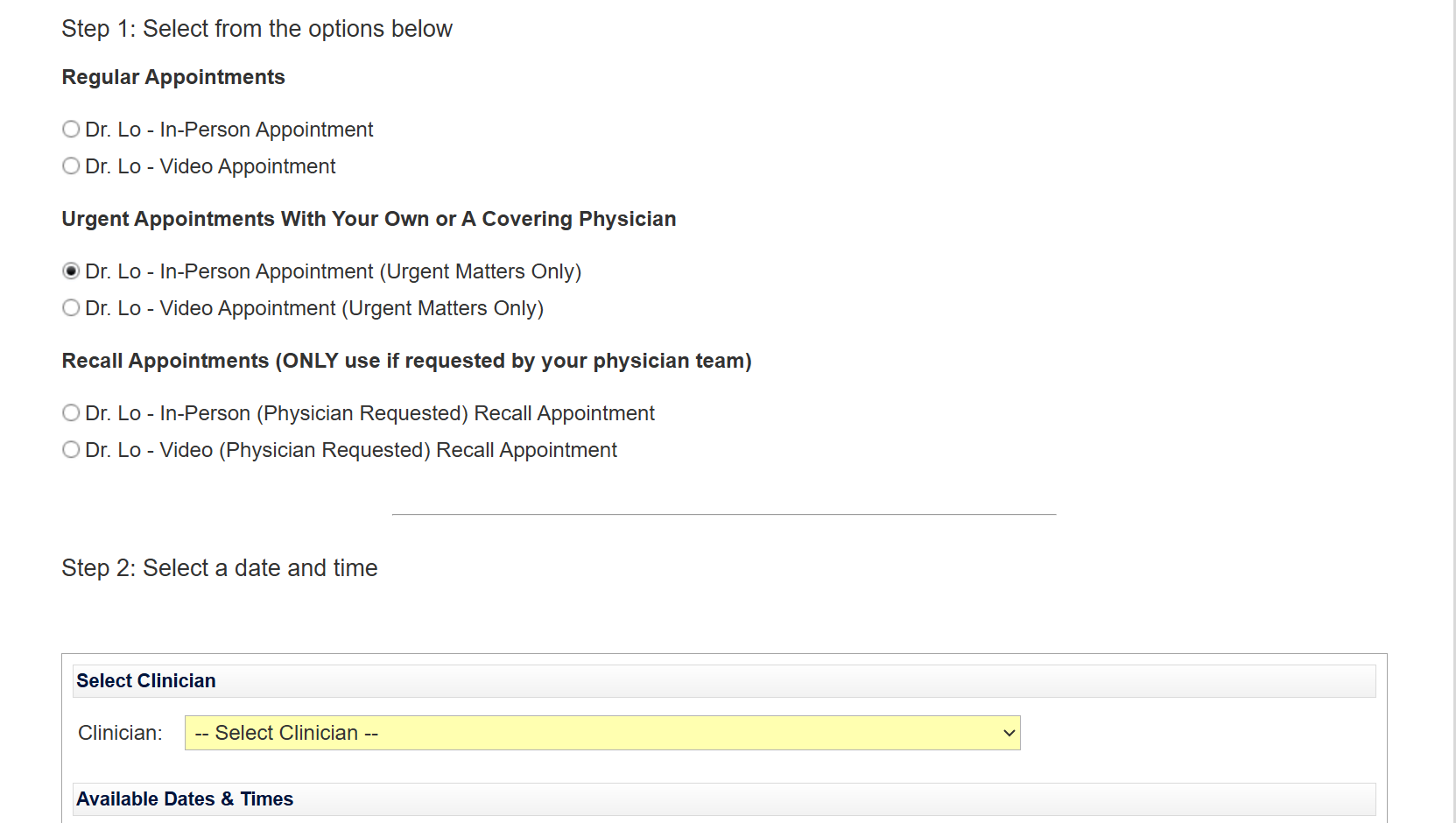
Urgent daytime appointments are made available 24–54 hours in advance on days when your physician is working in the clinic.
If your physician is away, a covering physician may offer a similar number of urgent appointments for their patients instead. This means you'll usually see your own physician, but that's not always the case.
Depending on your physician, these appointments may be available in person or by video.
Select the urgent appointment option to see available times.
5. Choose a clinician
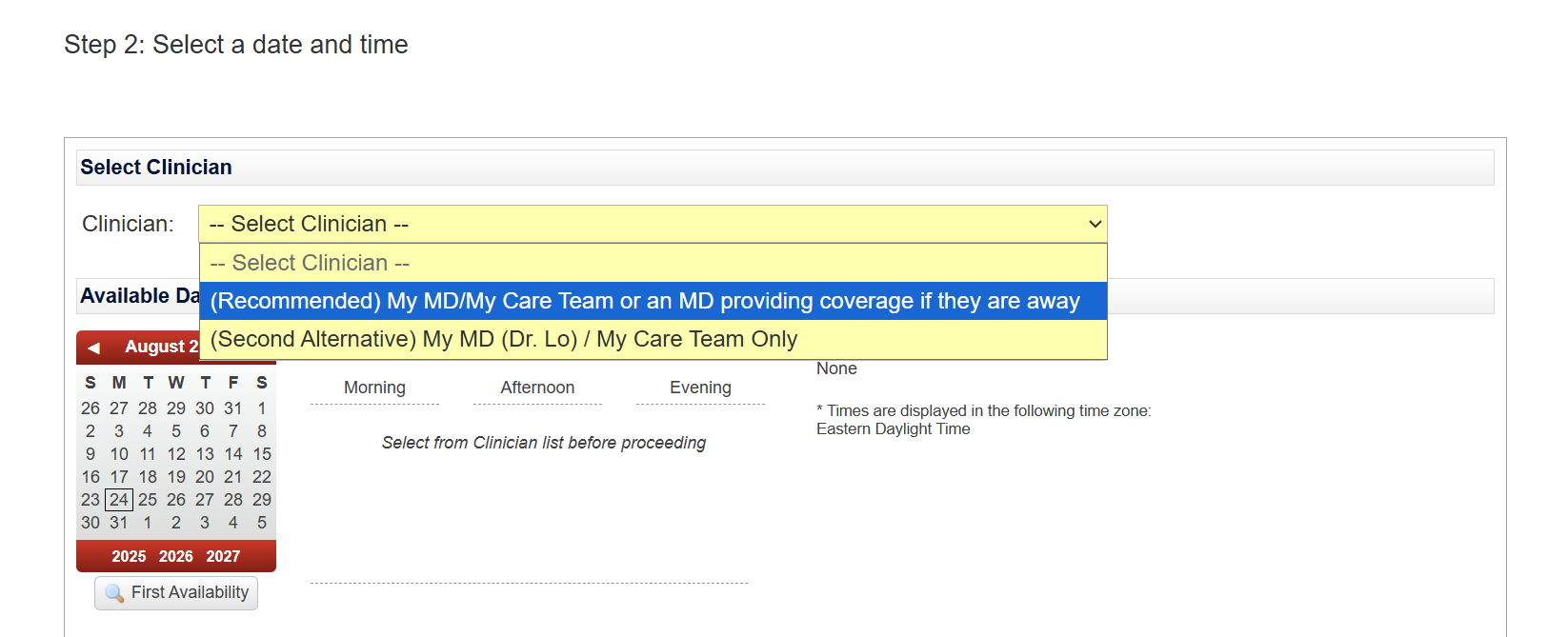
You'll then be asked to select a clinician.
The recommended option is: My MD/My Care Team or an MD providing coverage if they are away
This gives you the option of seeing your own physician or a physician who is covering for them.
You can also choose My MD/My Care Team Only if you specifically want to see your own physician or care team.
6. Find an available time
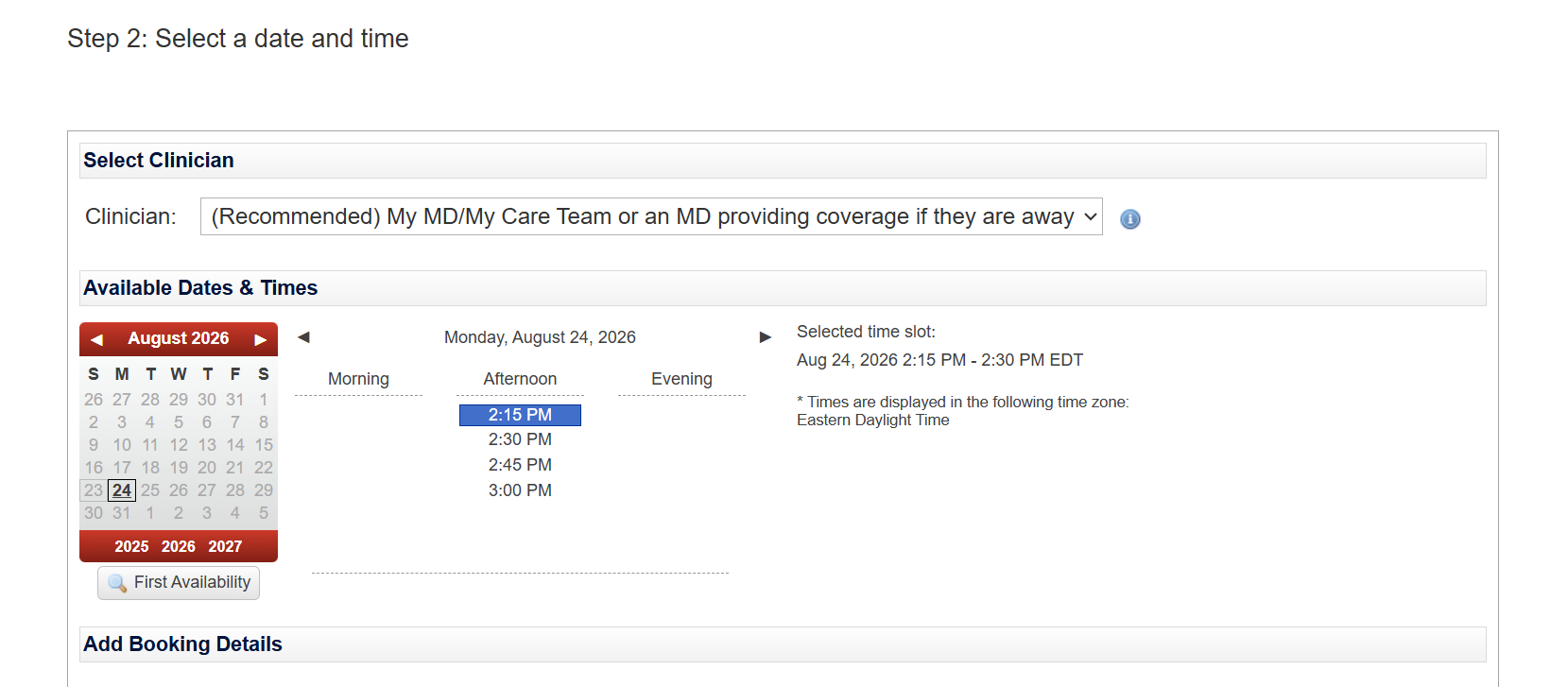
Once you've selected your clinician preference, you'll be able to see the available dates and times.
You can look through the calendar yourself or select First Availability to find the earliest available appointment.
Choose the date and time that works best for you.
7. Add your booking details
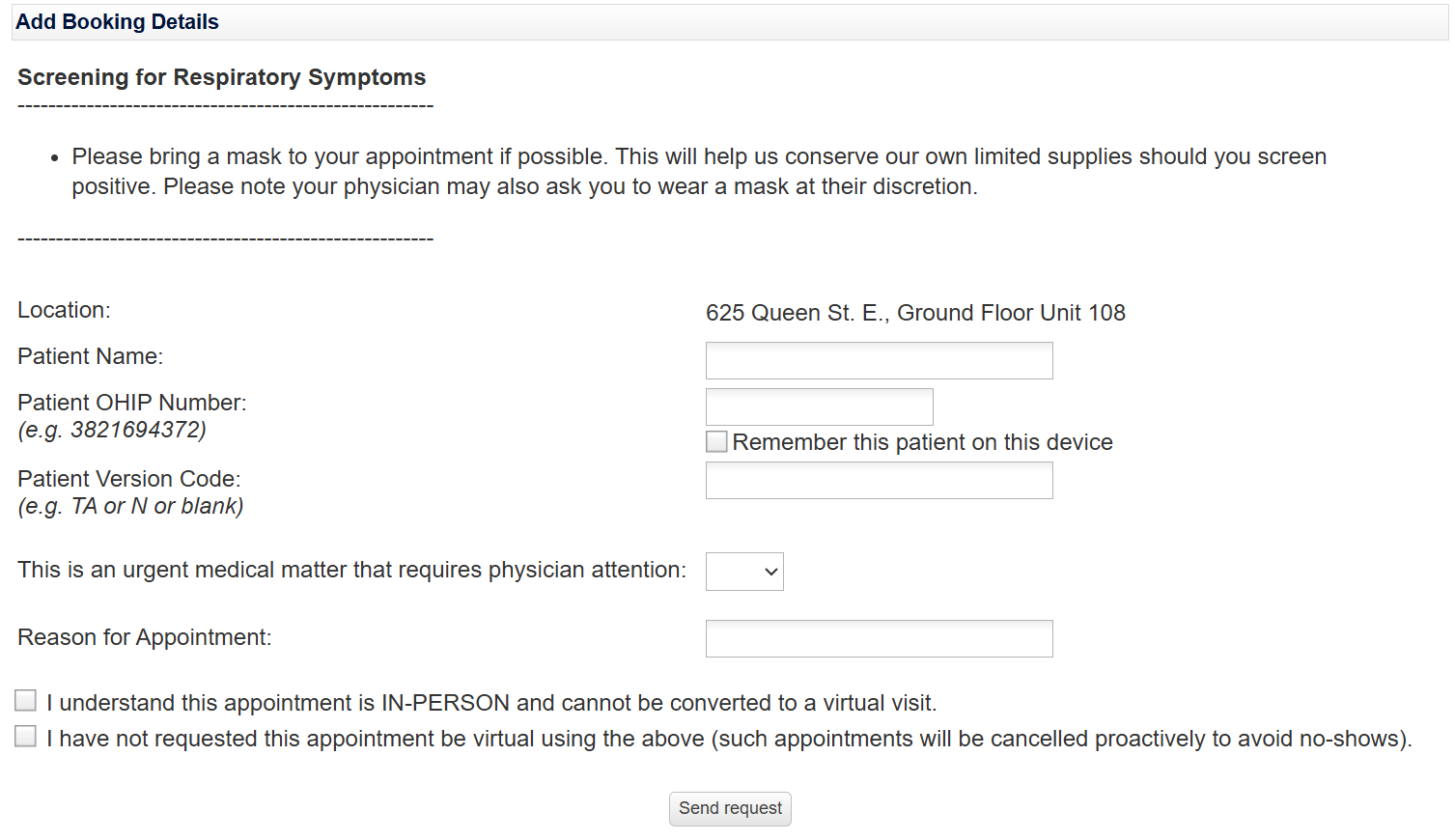
After selecting your appointment time, scroll down to the Add Booking Details section.
You'll be asked to provide information such as your name, OHIP number, and the reason for your appointment.
Once you've entered the requested information, click Send Request.
And that's it — you've submitted your request for an urgent appointment!
WHAT IF THERE AREN'T ANY URGENT APPOINTMENTS AVAILABLE?
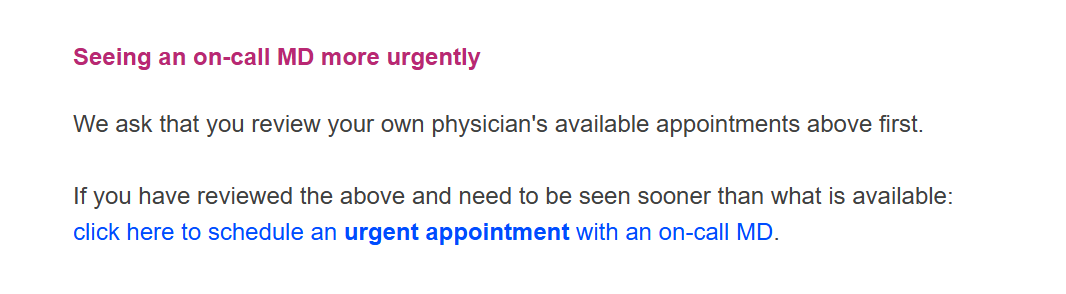
If you've checked the urgent appointments with your own physician or a covering physician but need to be seen sooner, there is another option.
Scroll down to the section titled Seeing an on-call MD more urgently, and click the link to book an urgent appointment with an on-call MD.
Here's what to know about on-call appointments:
When: Monday to Thursday evenings and Saturday and Sunday mornings
Who you'll see: The physician providing on-call coverage, rather than your regular physician
Where: The location can vary depending on the day and appointment
How: Urgent after-hours/on-call visits are in-person only. There is no virtual option.
When you can book: These appointments can generally be booked 24–54 hours in advance
➤ Please note that after-hours or on-call urgent appointments are not available on Friday evenings.
If there isn't an appropriate appointment available with your physician or an on-call MD, visit our emergency resources page for information about other urgent care options.
For non-emergency medical advice, you can also call Telehealth Ontario. A registered nurse is available 24 hours a day, seven days a week to provide health advice. Please keep in mind that Telehealth Ontario does not have access to your medical records.
A QUICK REMINDER ABOUT URGENT VS. ROUTINE APPOINTMENTS
Urgent appointments are meant for new or worsening concerns that need medical attention sooner rather than later.
They're not intended for long-term or ongoing issues that can wait for a regular appointment. For example, if you've been managing the same concern for months and want to discuss treatment options or follow-up care, a regular appointment is the better option.
Not sure which type of appointment is right for you? That's okay — you don't have to figure it out on your own. You can use the “Help deciding when to book an urgent appointment” option on your physician's homepage for additional guidance.
And if you're experiencing a medical emergency, don't wait for a clinic appointment. Call 911 or go to the emergency department.
Not sure where to start?
We hope this guide makes the process a little easier and helps you feel more confident about where to start. When in doubt, use the resources above or reach out to a healthcare professional for guidance.